Network Utilities Suite • Version 2.0

Windows Network Diagnostics & Discovery Tools

Two standalone, high-performance Windows applications designed for system administrators, IT specialists, and network engineers. Monitor latency stability with Ping Checker Pro 2 and discover local subnet infrastructure with IP Scanner Pro.

Tool 1 • Latency & Stability Monitor
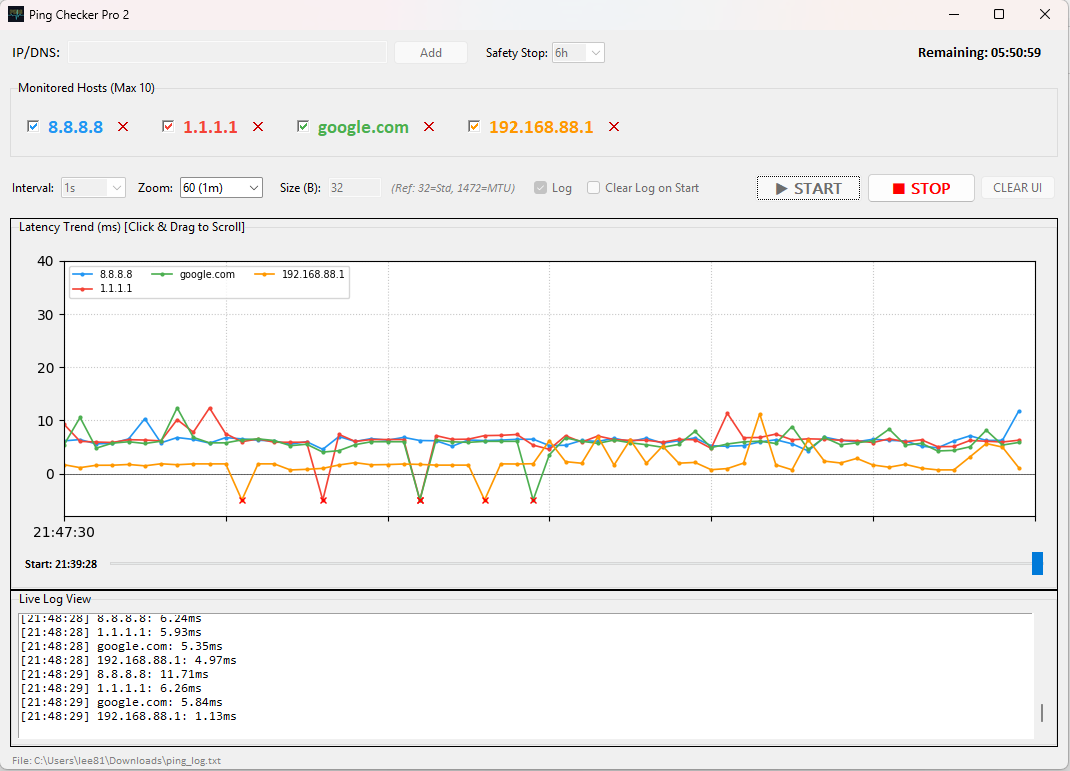
Ping Checker Pro 2

Continuous multi-target ICMP latency graphing with 7-day timeline scrubbing, custom packet payload sizes (32B – 1472B MTU), keyboard shortcuts, and asynchronous audit logging.

Ping Checker Pro 2 - [Live Dashboard]
Ping Checker Pro 2 Interface
🌐
10-Host Concurrent Monitoring

Track up to 10 IP addresses or domain names simultaneously with distinct color-coded trendlines and individual host visibility toggles.

🕒
7-Day Timeline Scrubbing

Store up to 604,800 records in memory. Drag the full-width timeline slider left to enter ⏸ PAUSED mode and inspect historical spikes.

⌨️
Keyboard Precision Navigation

Nudge timeline point-by-point with Left/Right Arrow keys or hold Shift + Arrow for 10x fast rewind/forward.

📜
Asynchronous Audit Logging

Non-blocking background thread writes timestamped logs to ping_log.txt without UI lag. Features dual timestamps (History Since & Last Start).
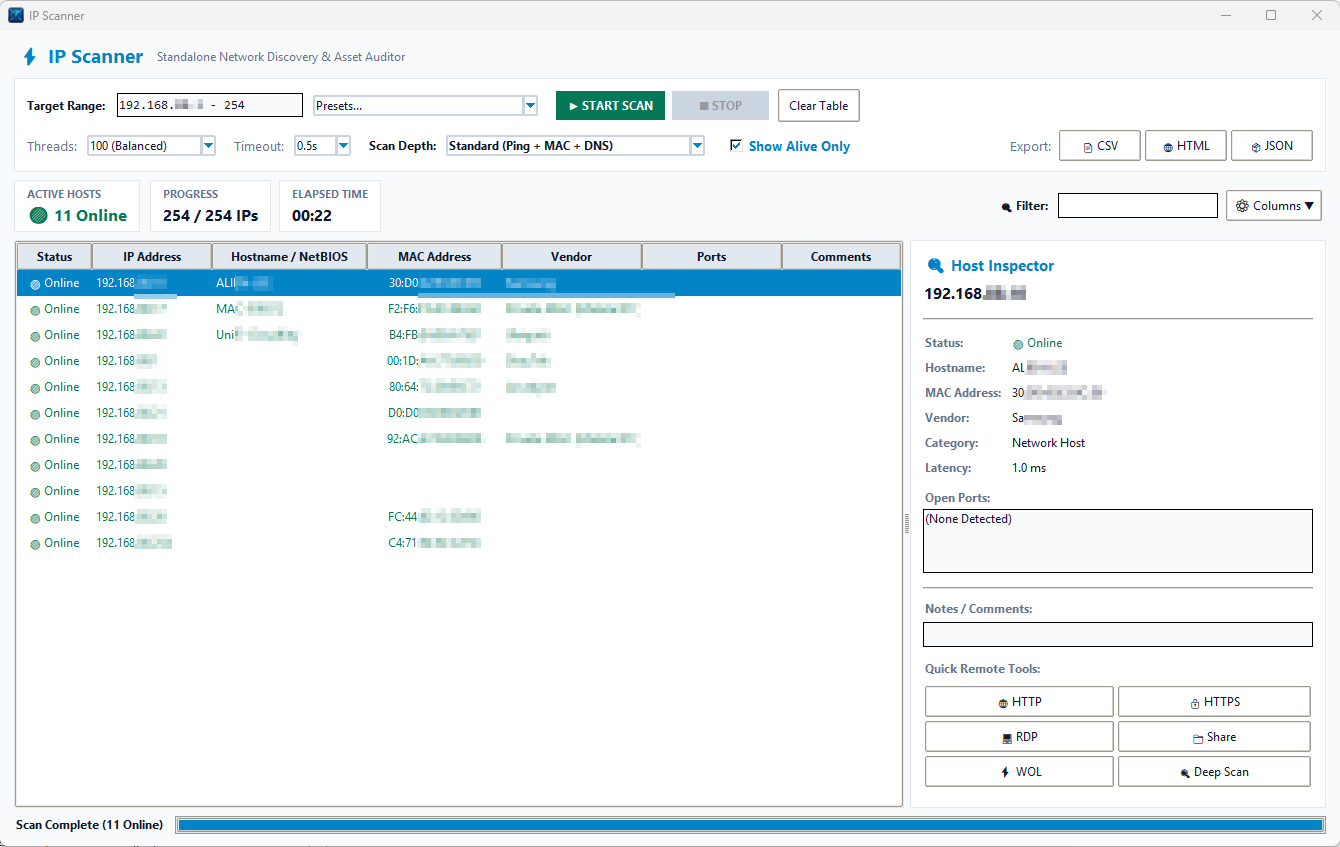
Tool 2 • Subnet & Device Discovery

IP Scanner Pro

Fast multi-threaded network scanner that parses local subnets, resolves MAC addresses & IEEE OUI hardware vendors, detects open ports/services, and exports audit reports.

🔍
Subnet & IP Range Scanning

Auto-detects active local subnet ranges (e.g. 192.168.1.0/24, 192.168.88.1-254) or custom IP lists with high-speed parallel worker threads.

🏷️
MAC & Hardware Vendor Resolution

Uses Win32 SendARP API and ARP cache lookups to resolve MAC addresses and identify manufacturers (Apple, Cisco, Ubiquiti, Synology, Raspberry Pi, etc.).

🔌
Port & Service Fingerprinting

Scans common operational ports (HTTP, HTTPS, SSH, RDP, SMB, VNC, SNMP, Printer) and automatically categorizes active network hardware.

📋
Quick Actions & Exporting

Launch 1-click web connections, SSH sessions, or RDP directly from discovered IP rows. Export complete inventory tables to CSV or JSON.

IP Scanner Pro - [Subnet & Asset Auditor]
IP Scanner Pro network discovery interface showing active IP table and host inspector pane

Better Together: Integrated IT Workflow

Combine both tools for complete network discovery, baseline auditing, and continuous quality monitoring.

STEP 1 • DISCOVER

Scan Subnet with IP Scanner Pro

Run a quick subnet scan to discover all online devices, identify rogue IPs, query MAC vendors, and uncover open management ports.

STEP 2 • MONITOR

Track Quality with Ping Checker Pro 2

Add critical infrastructure IPs (routers, access points, gateways, servers) to Ping Checker Pro 2 for continuous 7-day latency tracking and drop alerts.

Tool Specifications Matrix

Compare technical capabilities and core features across both diagnostic tools.

Capability / Feature Ping Checker Pro 2 IP Scanner Pro
Primary Function Continuous ICMP Latency & Drop Monitoring Multi-Threaded Subnet & Device Discovery
Target Capacity Up to 10 Hosts (Parallel Graphing) Full Subnets (e.g. /24, 254+ IPs)
Timeline History 7 Days (604,800 Points In-Memory) Snapshot Scan Results Table
Hardware Vendor Lookup N/A Win32 SendARP + IEEE OUI Vendor Database
Port Scanning N/A Common Ports (HTTP, HTTPS, SSH, SMB, RDP, VNC)
Controls & Scrubbing Full-Width Slider, Left/Right Arrow Keys Filter Search Bar, Column Sorting
Export Formats Text Audit Log (ping_log.txt) CSV, JSON, HTML Reports
Executable Bundle Standalone Windows .exe Standalone Windows .exe

Download Center

Get the latest stable 2.0 standalone executables for Windows 10 and Windows 11.

Ping Checker Pro 2

Version 2.0.0 • Latency Monitoring

Download PingCheckerPro2.exe
🔍

IP Scanner Pro

Version 1.0.0 • Subnet Discovery

Download IPScanner.exe
🛡️
Administrator Privilege Notice:
Both applications require Elevated Privileges to send raw ICMP socket packets and issue Win32 SendARP queries. Please right-click the executable files and select "Run as Administrator" for full functionality.